 GBurn
GBurnLaser design and control that works like LightBurn, in your browser.
Draw or import, put shapes on layers with a speed and a power, preview the job and burn it. Cut, score and engrave on one design. Free online with a free account, or as a free desktop app for Mac, Windows and Linux that drives GRBL lasers over USB. The same account as GCarve.
Already use GCarve or GSketch? Sign in with the same account: your plan covers every app.
gcarve.appGBurn is free and made by a small shop. If it saves you time, a donation keeps it going.
♥ Donate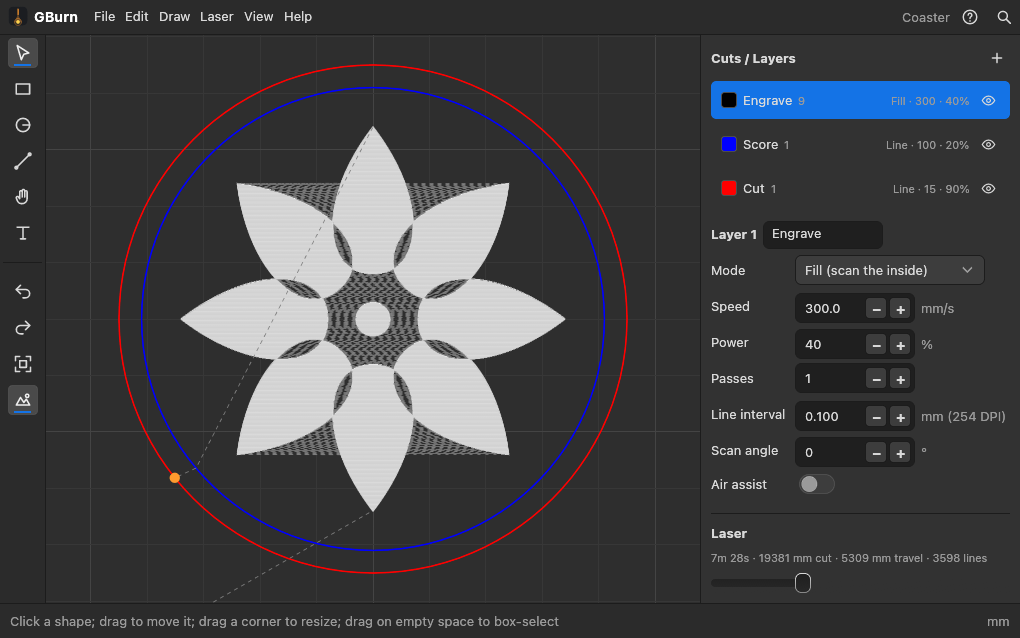
The LightBurn workflow, without the install
Shapes, lines and text
Rectangles, ellipses and lines with ⇧ for squares, circles and snapping; text in a bold or regular face at a typed height. Move, resize from a corner, mirror, rotate, duplicate, nudge with the arrows, type exact X / Y / W / H.
SVG, DXF and LightBurn files
Drop a file on the canvas: Illustrator, Inkscape and Affinity SVGs, DXF from any CAD, and .lbrn2 projects from LightBurn, each file layer on its own cut layer.
Cut settings per colour
Line mode follows the outline (cut or score); Fill mode scans the inside (engrave) at a line interval and angle you set. Speed in mm/s, power in %, passes, air assist, and an eye that leaves a layer out of the job.
See the job before it runs
Every stroke in order, the travel between them dashed, a slider to scrub through, and the time estimate from your machine's speed and acceleration.
Jog, frame, burn
Connect a GRBL laser over USB (most diode lasers: Creality Falcon, Atomstack, Sculpfun, Ortur, xTool D1 and more). Home, jog, Frame the outline with the beam off, Start, Pause and Stop. Nothing fires until you press Start.
A simulated laser built in
No machine at hand? The simulated laser runs any job against a real GRBL controller model, so you can learn the flow and check your settings first.
G-code and SVG
Export the job as G-code (mm, M4 dynamic power, the same file the app streams) for any sender, or the design as SVG. Designs save as .gburn files or in your account.
Built around the safety rules
Frame moves with the beam off, the Stop button is always on screen, the machine's door and alarm state show as it reports them, and a recovery copy of your design is kept 3 s after every change.
Machines
GRBL lasers over USB work today. CO2 lasers with a Ruida controller (Thunder Laser Nova and most Chinese CO2 machines) and fibre galvo markers (EZCAD2 boards) are being built next, starting with the shop's own Thunder Nova 63 and Aurora 8.
Now: GRBL, grblHAL, FluidNC
Diode lasers and conversions: USB serial at 115200, laser mode with M4, $30 read from the controller so power scales right. The desktop app drives them; the web app exports the G-code.
Next: Ruida CO2 and EZCAD2 galvo
Ruida over the network (and .rd files for a USB stick), then the galvo boards over USB with your lens correction file and rotary. Follow the changelog.
Pricing
The same plans as GCarve, and one plan covers every app.
$0
Everything, online with a free account or on your desktop.
- Every tool, every import, G-code and SVG export
- A free account keeps 3 designs in the cloud (shared with GCarve and GSketch)
- Free desktop apps for Mac, Windows and Linux, offline, no account needed, with laser control
$7/month or $59/year
GBurn, GCarve and GSketch together.
- Everything in Free, in every app
- 200 cloud designs, projects and models
- Priority answers
Pro opens soon; until then everything is free. Create a free account and we'll email you when it does · Prefer a one-time thank-you? Donate.
Questions
Is GBurn free?
Yes. Every tool, saving and export are free: online with a free account (3 cloud designs), and the desktop apps are free to download. Pro adds 200 cloud designs, for GBurn, GCarve and GSketch together.
Is it LightBurn?
No. GBurn is an independent app that works the way LightBurn users expect: layers with cut settings, a preview, framing and a laser panel. LightBurn Software has nothing to do with it. Your .lbrn2 files import.
Can the web version drive my laser?
Not yet: today the browser version designs, previews and exports G-code, and the desktop app drives GRBL lasers over USB. Browser control (WebSerial) and a small helper for network lasers are on the way.
Does it work on a Mac or Chromebook?
Yes, in Chrome, Edge, Firefox or Safari. There are also free desktop apps for Mac (Apple silicon and Intel), Windows and Linux.